Article Summarizer: Summarize Any Article Online in Seconds updated 2026
supawriter

If you’ve ever pasted a link and thought, "summarize this article," you’re in the exact use case an article summarizer is built for, turning long text into a shorter summary you can skim, share, and use.
For teams, summaries are more than a convenience. They cut reading time, speed up decisions, and create reusable building blocks for briefs, newsletters, and SEO content. That workflow is easier with Supawriter because you can go from research, to a clean summary, to an optimized draft in one place.
What an article summarizer does (and when to use one)
An article summarizer is an AI (or rule-based) tool that condenses a piece of text into its most important points. Most modern AI summarizers support multiple input types like pasted text, a webpage URL, or a PDF.
Extractive vs abstractive summaries
Most summarizer tools use one of two approaches:
- Extractive summarization pulls the most important sentences directly from the original text. This tends to preserve wording and reduces the risk of changing meaning.
- Abstractive summarization rewrites the content into a new, shorter explanation. This is often easier to read, but it can introduce mistakes if you don’t verify key facts.
Google Cloud’s overview of AI summarization describes the goal as distilling content into a shorter, digestible format (Google Cloud AI summarization). The quality still depends on the model, your input, and whether you check the output.
Best use cases: research, meetings, newsletters, SEO briefs
You’ll get the most value from an article summarizer when the job is "compress and keep meaning," such as:
- Research triage: scan 10 articles, then fully read the best 2
- Meeting prep: convert long docs into discussion bullets
- Newsletter drafting: pull out key points and quotes (then rewrite)
- SEO briefs: extract claims, definitions, and examples for writers
If you’re building an SEO pipeline, pair summarization with a repeatable process like a content calendar. Here’s a strong framework: how to build a content calendar step by step.
Limits: accuracy, context, and bias
Even the best AI summarizer can:
- Miss nuance (especially in opinion pieces)
- Drop important constraints (limitations, time windows, assumptions)
- Misstate numbers or names (rare, but high impact)
Treat the output as a draft summary. You’re still responsible for accuracy.
How to summarize an article in 60 seconds (with AI or manually)
This workflow works whether you’re using a free article summarizer, a PDF summarizer, or a built-in assistant.
Step 1: choose your input (URL, text, PDF)
Pick the input method that matches your source:
- URL for public web pages
- Paste text when paywalls or formatting break URL-based tools
- Upload PDF for reports, whitepapers, research papers
Before you upload anything, remove sensitive details (customer data, private financials, internal strategy). Many tools store or process content on external servers.
Step 2: pick the output format (bullet points, paragraph, outline)
Choose the summary format based on what you’ll do next:
- Bullet points: fastest to scan and easiest to verify
- Short paragraph: best for sharing in chat or email
- Outline: best for turning into a draft or briefing document
Also choose a length target (for example, "10 bullets" or "150 words"). Constraints make AI summaries more consistent.
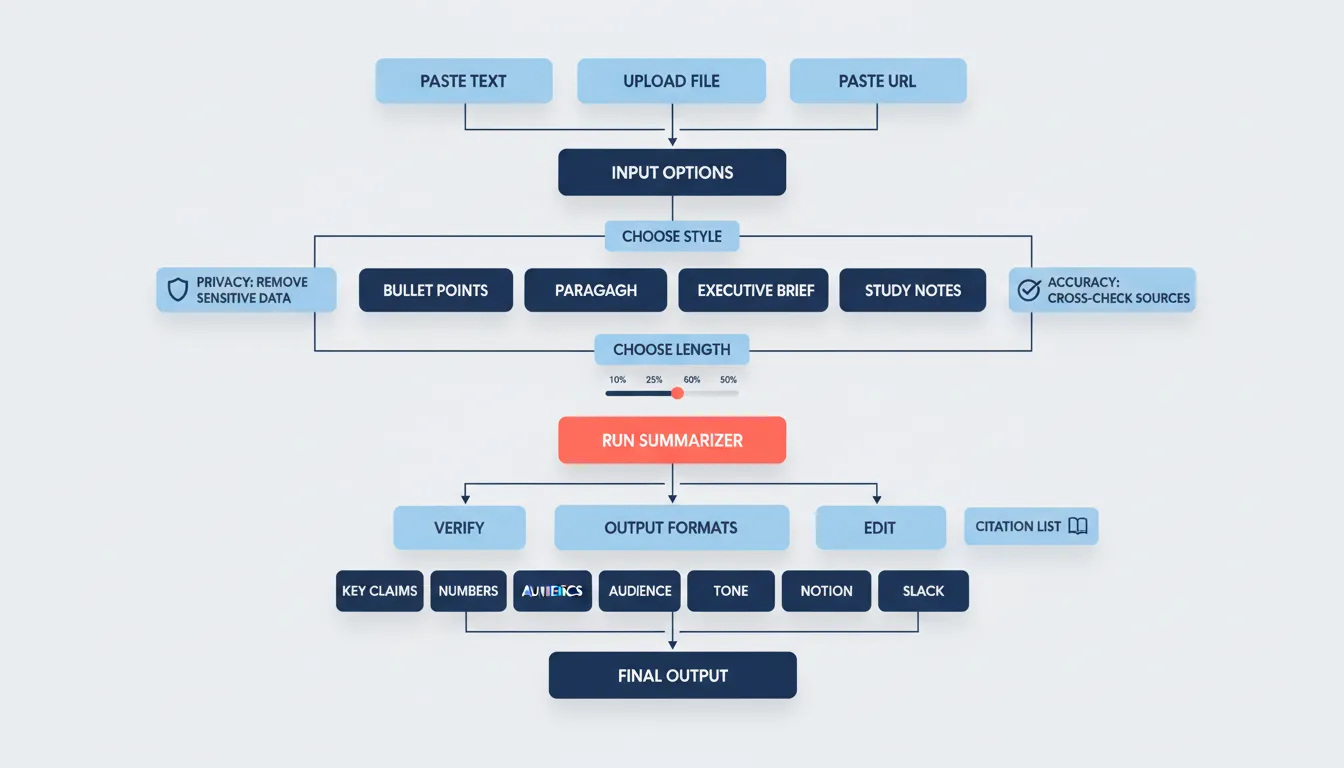
Step 3: verify key claims and rewrite for your audience
Verification is the difference between useful and risky. Do a quick pass for:
- Names, dates, places
- Any numbers, percentages, benchmarks
- The author’s main claim and supporting evidence
If you’re summarizing for stakeholders, rewrite the final output in their language:
- Executives: decisions, risks, recommendations
- Growth team: tactics, channels, constraints
- Product: user problems, requirements, tradeoffs
When it comes to turning summaries into publishable assets, Supawriter helps you keep the chain intact: research, summary, SEO-optimized draft, scheduled publishing.
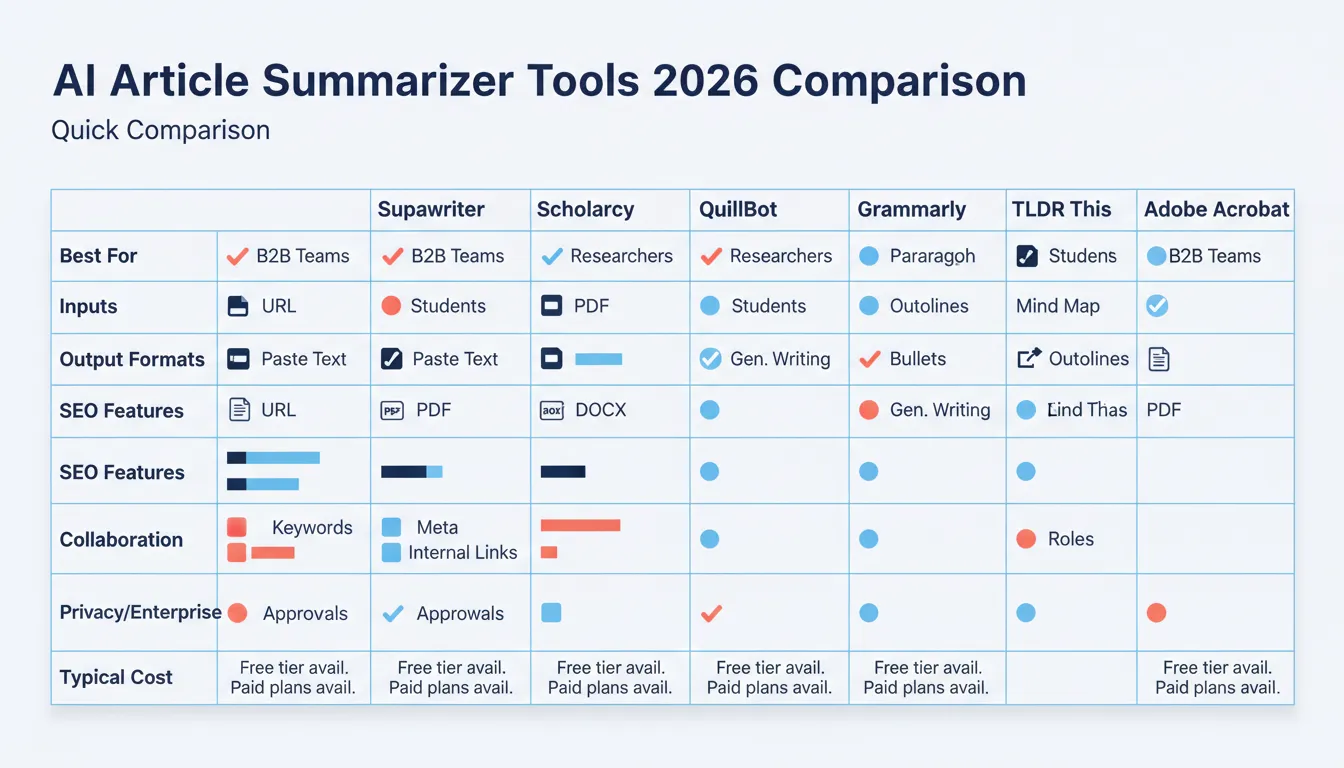
Best AI article summarizer tools in 2026 (quick comparison)
The results for "summarize this article" are full of online summarizer tools. The best choice depends on your workflow, quick one-off summaries vs team-ready content production.
| Tool | What it’s best for | Typical inputs | Typical outputs | Notes |
|---|---|---|---|---|
| Supawriter | B2B teams turning summaries into SEO content | Paste text, research notes (and workflow-based inputs) | Bullet points, outlines, long-form drafts | Strong fit when summarization is part of a larger content engine (SEO, internal links, scheduling) |
| Scholarcy | Researchers and study workflows | Documents, articles | Structured summaries, key points | Built around academic reading and key-term extraction (Scholarcy) |
| QuillBot | Quick rewriting and summarizing | Paste text | Paragraph summaries | Common choice for simple summaries and paraphrasing (QuillBot Summarizer) |
| Grammarly | General writing assistance plus summarizing | Paste text | Short summaries | Positioned as a broad writing suite with summarization (Grammarly summarizing tool) |
| TLDR This | Fast webpage summaries | URLs, text | TLDR-style output | Designed for quick digestion of online content (TLDR This) |
Supawriter
Supawriter is best when you don’t just need a summary, you need to do something with it.
Key features:
- AI writing for long-form content (including 2,500+ word articles)
- SEO optimization: keyword targeting, meta tags, internal linking support
- Smart scheduling and workflow support for consistent publishing
- Real-time SERP analysis and fact verification capabilities as part of a content process
Pros:
- Built for teams: repeatable workflow, fewer one-off summaries that get lost
- Strong bridge from "summarize this article online" to a publishable draft
Cons:
- If you only need a single quick TLDR once a month, a lightweight tool may be enough
Best for:
- SaaS founders and growth teams using summaries to produce briefs, landing page copy, and SEO content
Pricing:
- Offered as a paid platform (check current plans on the product site)
Scholarcy
Scholarcy focuses on turning dense reading into structured outputs.
Key features:
- Article and paper summarization
- Emphasis on key terms, claims, and skimmable structure
Pros:
- Helpful for research-style reading and study workflows
Cons:
- Less oriented to SEO publishing workflows than an end-to-end platform
Best for:
- Researchers, students, and teams summarizing papers and reports
Pricing:
- Free and paid options may be available depending on plan and usage (Scholarcy)
QuillBot
QuillBot is often used for quick summarization and rewriting.
Key features:
- One-click AI text summarizer
- Output length controls (varies by plan)
Pros:
- Easy for quick, paste-and-go summaries
Cons:
- Less workflow support for teams that need approvals, publishing, or SEO structure
Best for:
- Individuals summarizing text and refining wording
Pricing:
- Typically offers free usage plus paid tiers (QuillBot Summarizer)
Grammarly
Grammarly positions summarization as part of a broader AI writing assistant.
Key features:
- Summarizing tool that condenses text into a shorter summary
Pros:
- Convenient if your organization already uses Grammarly for editing
Cons:
- Not purpose-built as an article summarizer for URLs and PDFs workflow first
Best for:
- Teams wanting summarization inside a general writing environment
Pricing:
- Varies by plan; see Grammarly’s tool page for current availability (Grammarly summarizing tool)
TLDR This
TLDR This is designed for fast web content condensation.
Key features:
- Web-first TLDR experience
- Quick, digestible output
Pros:
- Great for quick scans and reducing information overload
Cons:
- Not designed for producing SEO-ready drafts or managing an editorial pipeline
Best for:
- Readers summarizing articles online and sharing key points fast
Pricing:
- Varies by offering; review their site for the current model (TLDR This)
Summarize this article PDF, research paper, or long report (without losing key points)
PDF and research summarization is where "shorter" can become wrong, because the important content is often in methods, limitations, tables, and definitions.
PDF tips: structure first, then compress
Use this approach:
- Identify the sections (executive summary, findings, methodology, appendix)
- Summarize each section into 2 to 5 bullets
- Write a top-level summary that includes key numbers and caveats
If your tool supports it, ask for "key points plus any critical caveats." That one line prevents many bad summaries.
Research paper tips: keep methods, results, and limitations
For research, a good summary usually includes:
- Research question
- Method (high level)
- Key results (with units and sample sizes when available)
- Limitations (what the study cannot claim)
- Practical takeaway
If you’re doing this frequently, it’s worth standardizing. The University of Connecticut Writing Center has a helpful overview of research-article structure (IMRAD and beyond), which is exactly what you want your summaries to preserve (UConn Writing Center PDF).
Team workflow: notes, citations, and version control
Summaries become more valuable when they’re reusable:
- Store the source link and date accessed
- Capture direct quotes separately from paraphrased summary points
- Track versions so you know what changed and why
If you’re scaling content, connect summaries to your broader system. Pair this with a documented process like how to build a content strategy.
How to get better summaries: prompts, templates, and QA checklist
Once you have a decent AI summary, the biggest wins come from better instructions and faster QA.
Prompt templates for bullet points and executive briefs
Copy-paste prompts you can reuse with any AI text summarizer or assistant:
Bullet points (fast scan)
- "Summarize this article into 8 bullet points. Include any numbers, dates, and constraints. Avoid speculation."
Executive brief (decision-ready)
- "Write a 150-word executive summary: main claim, supporting evidence, risks/limitations, and recommended next step for a B2B SaaS team."
SEO content brief (writer-ready)
- "Extract: target audience, problem statement, key definitions, 5 key points, 3 examples, and 5 related keywords. Format as an outline."
To align your briefs with ranking requirements, keep an on-page checklist handy. This guide helps: on-page SEO checklist for 2026.
A QA checklist to catch hallucinations and missing context
Use this quick checklist before sharing:
- Did the summary keep the original article’s main claim?
- Are all numbers and proper nouns accurate?
- Did it drop any important "but" statements (limitations, exceptions, timeframes)?
- Is any sentence written as a fact without support?
- Is the summary appropriate for the reader’s context (executive vs specialist)?
Turn summaries into publishable SEO content with Supawriter
A summary is usually the starting point. Supawriter helps teams turn summarized research into consistent, brand-voice content that targets keywords, adds internal links, and publishes on a schedule.
If you’re currently stitching together multiple summarizer tools, docs, and publishing steps, centralizing that workflow inside Supawriter makes the process simpler and easier to repeat.
Grow your traffic on autopilot now
Join thousands of users already using our platform.